Extend your monitoring. See what PRTG cannot show alone.

Purpose-built monitoring extensions for backups, databases, applications and real-world IT services.

Simple setup. Smarter insight. Real results.

Two products.
One clearer monitoring picture.

PRTGPlugins and PRTG Trends Explorer solve different parts of the same operational challenge. Use either product independently—or combine them to move from richer monitoring data to service-level foresight.

Collect and extend

PRTGPlugins

Purpose-built sensors extend PRTG coverage into backups, databases, applications and other real-world services—without maintaining a maze of custom scripts.

PRTGPlugins reveals the signals. Trends Explorer shows what they mean—and where they are leading.

PRTGPLUGINS · MONITORING REFINED

PRTG reads your past.Trends Explorer tells your future.

No crystal ball. Just your data —
refined into foresight.

Turn PRTG history into service views, forecasts, correlations and reviewable intelligence — with AI when you want it.

REAL PRTG HISTORYAI OPTIONALHUMAN APPROVED
PRTGPlugins · Monitoring refined

Extend your monitoring.
See what PRTG cannot show alone.

PRTGPlugins extends PRTG with purpose-built sensors, smarter monitoring logic and deeper visibility into the software and services your business depends on.

Monitor backups, databases, Citrix environments, applications and custom services without building and maintaining complex scripts or investing in another monitoring platform.

Practical monitoring

Why choose
PRTGPlugins?

Extend native PRTG capabilities with purpose-built sensors
Gain clearer visibility into business applications and services
Monitor backups, databases, sessions and other operationally important systems
Deploy without the burden of developing and maintaining your own monitoring scripts
Use all-inclusive licenses with no separate maintenance fee
Install on the PRTG Core Server and relevant probe servers

Simple setup. Smarter monitoring.
Real operational insight.

From download to monitoring

Get started in
seven clear steps.

02
Register and log in to the site
05
Install the plugins on your PRTG Core Server and the relevant probe servers
06
Copy the required license file to the installation directory
07
Create the required sensors through the PRTG interface and start monitoring

Start with a trial.
See the results in your own monitoring environment.

PRODUCT IN MOTION
PRTGPluginsGUI
File   Configuration   Window   About
Trends ExplorerService viewsForecastsGuided intelligence
Then → now
WHERE IT STARTED

PRTG reads your past.

The original PRTGPluginsGUI made monitoring history visible. Trends Explorer turns that proven idea into guided foresight.
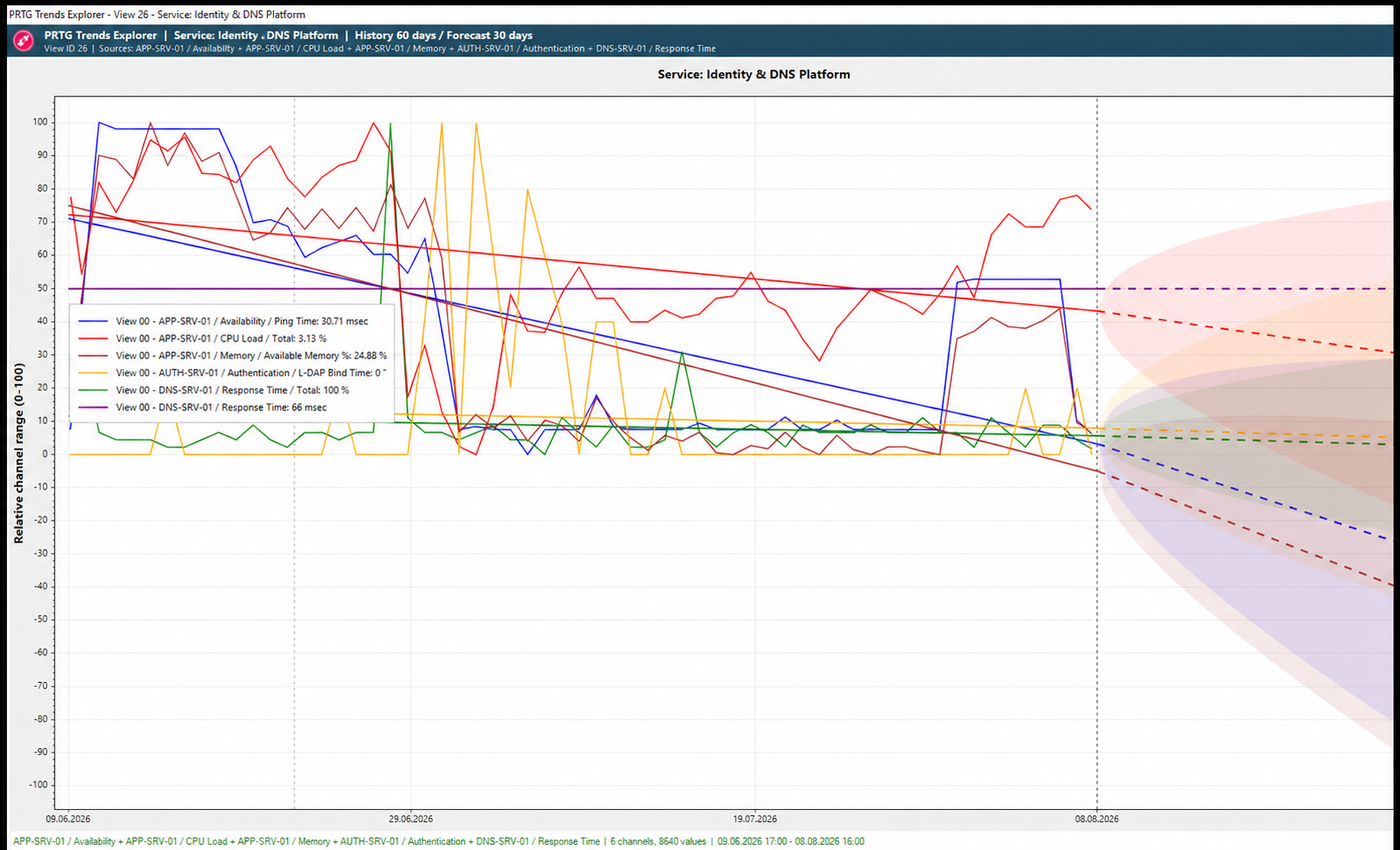
Forecast chart with prediction intervals
Forecast
GUIDED FORESIGHT

Trends Explorer tells your future.

Trend direction, prediction intervals and days to threshold bring what comes next into view.
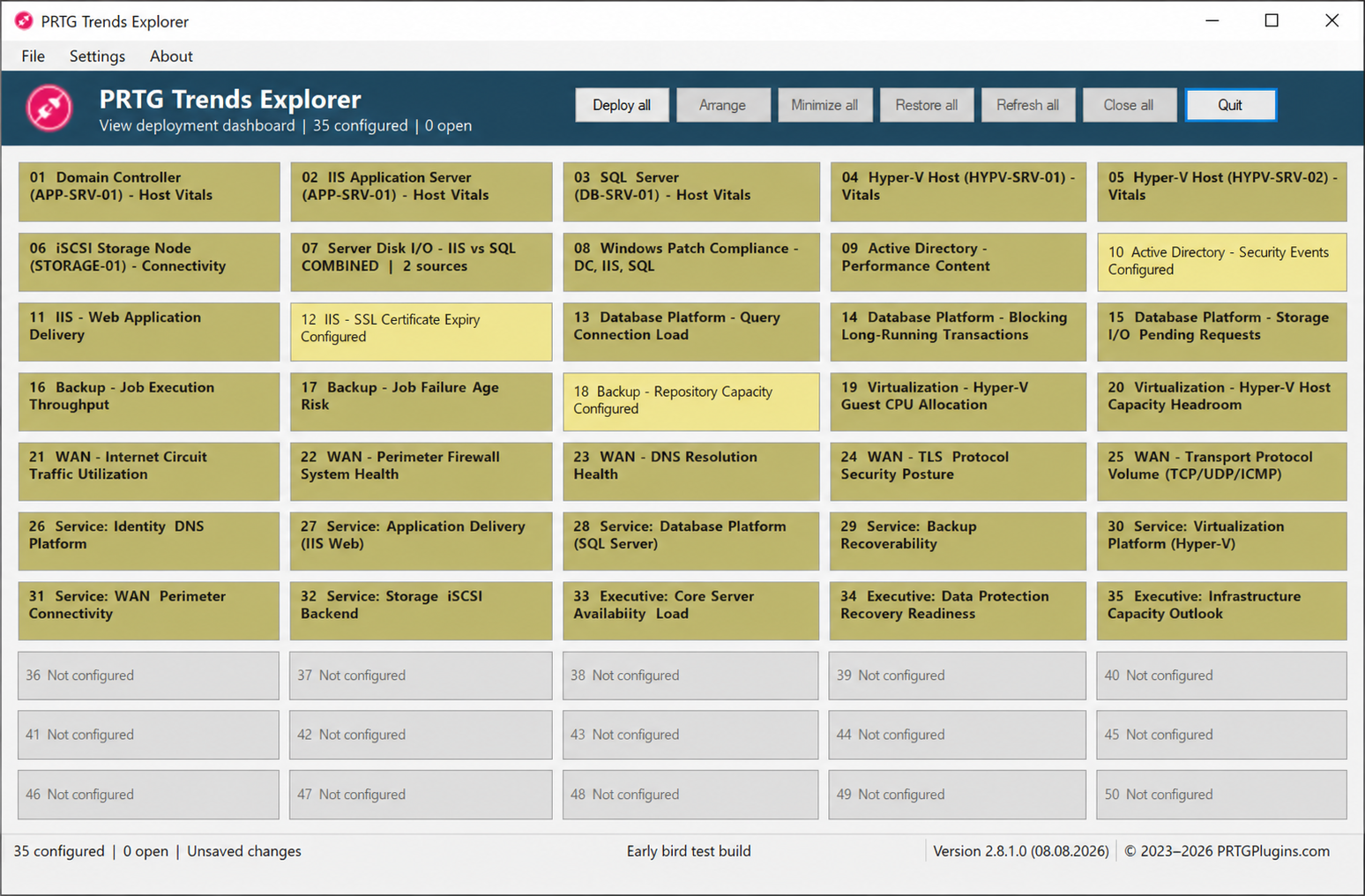
Service View dashboard
35 views
SERVICE VIEWS

See the service — not the sensor sprawl.

Group related PRTG signals on a shared timeline and understand the service they support.
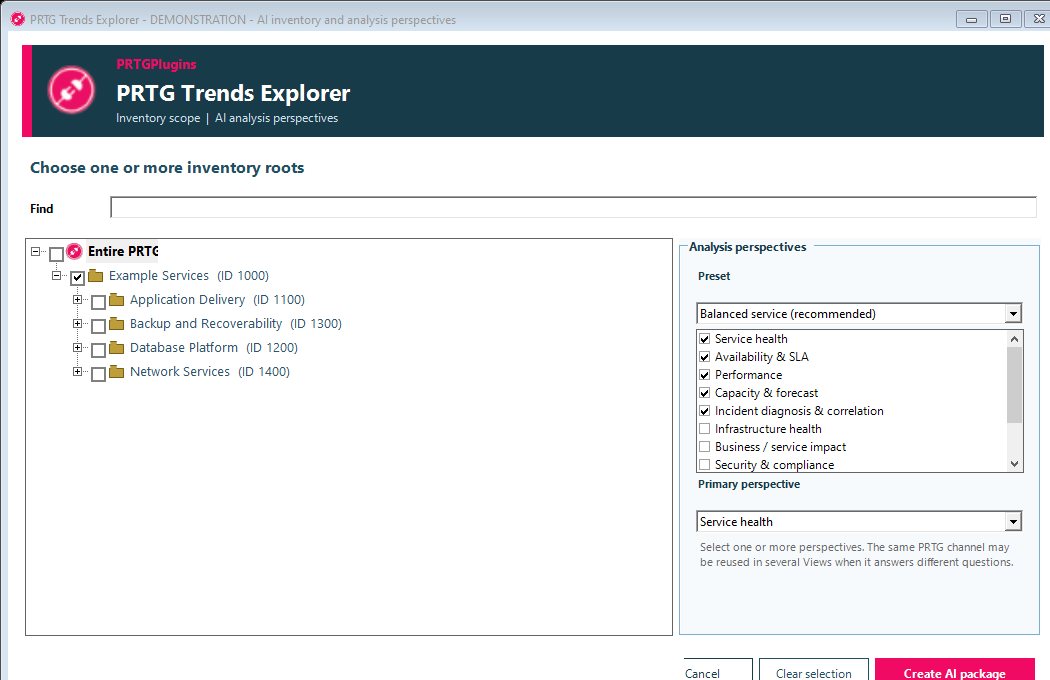
AI analysis perspectives
AI optional
REVIEWABLE INTELLIGENCE

Explain it with AI — when you want to.

Package the evidence, choose the perspective and review every proposal before it changes anything.
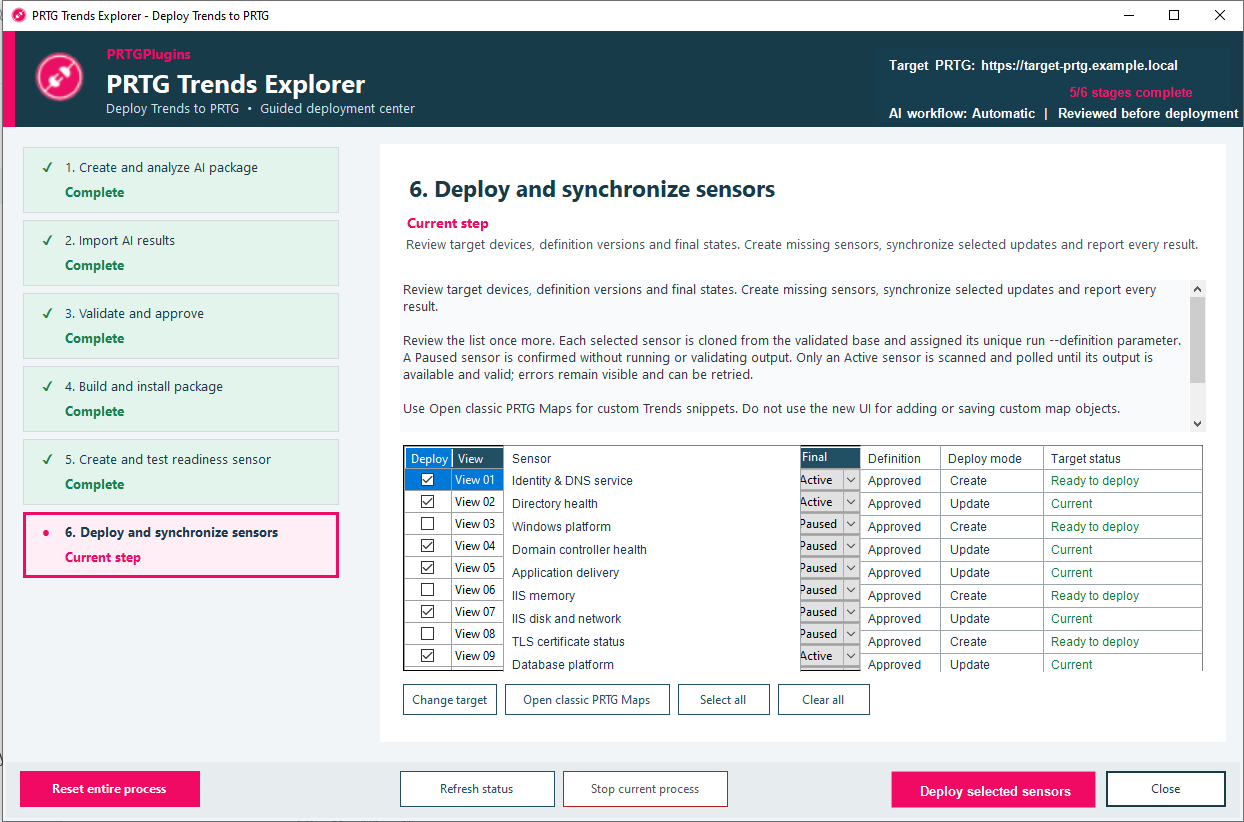
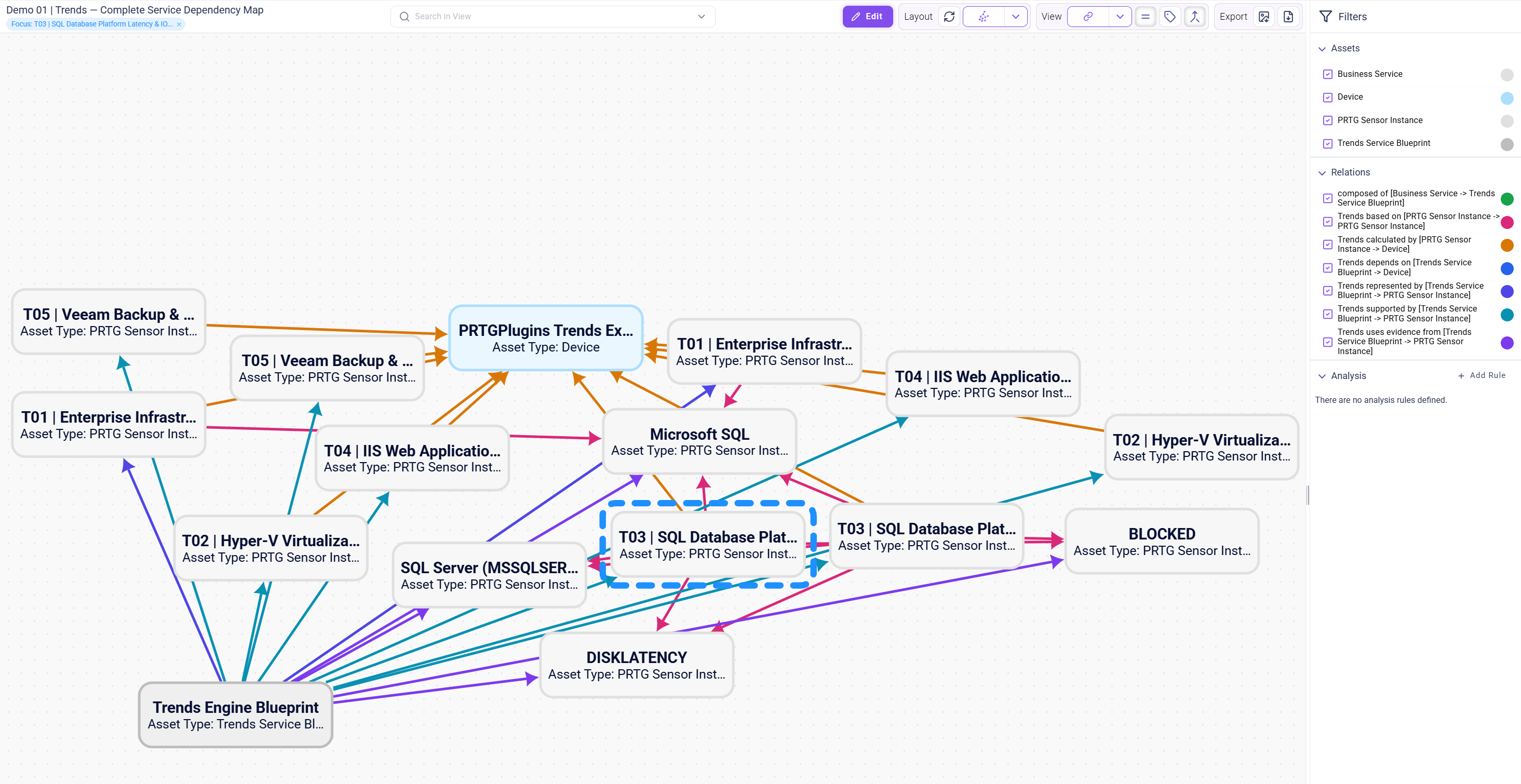
Guided deployment
Reviewed
CONTROLLED FEEDBACK

Return foresight to PRTG.

Publish approved insight as Trends sensors, status information and PRTG Map components.
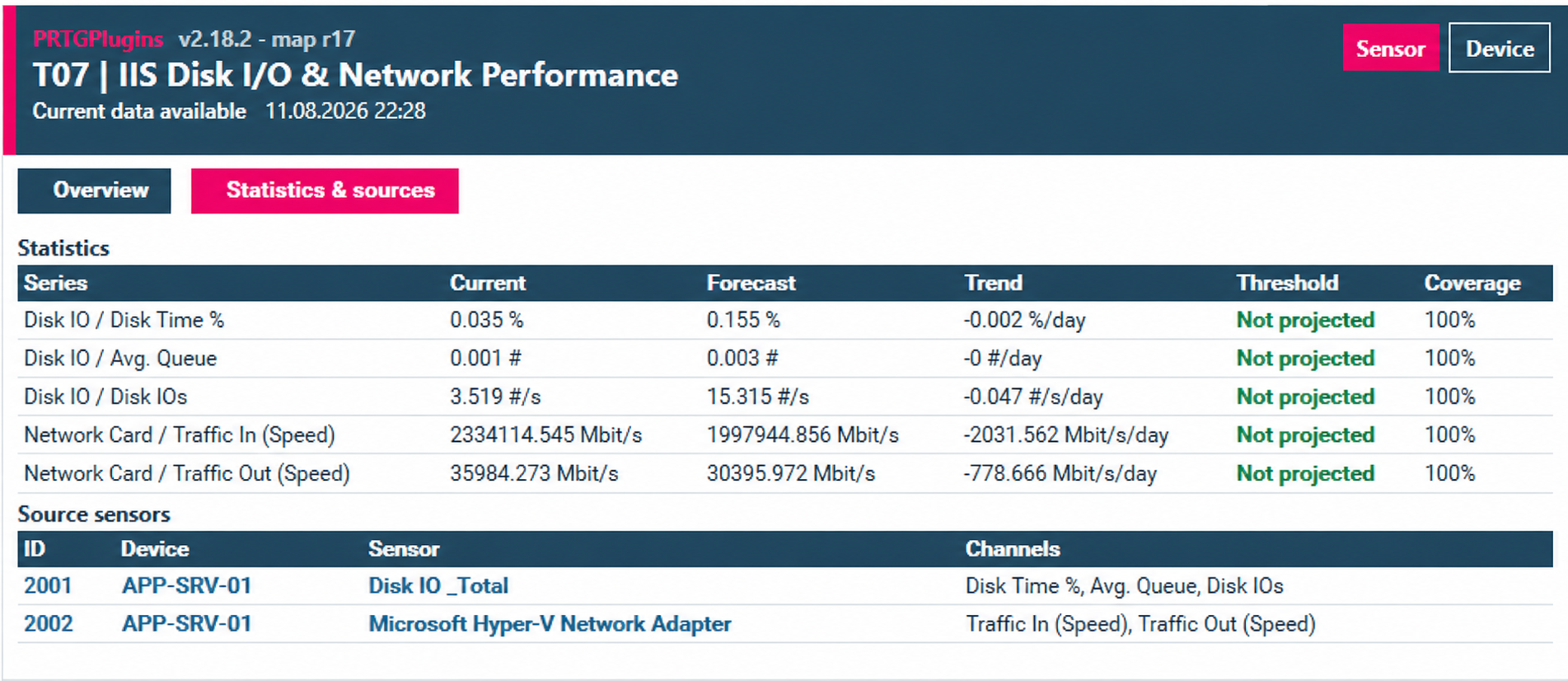
Operational forecast view
In context
OPERATIONAL FORESIGHT

Insight where operations happen.

Forecasts, statistics and source context remain visible in the operational view.

CONTINUOUS
FORESIGHT
01 Inventory02 Package03 Understand04 Design05 Deploy06 Measure07 Predict08 Learn & evolve
PRTG Trends Explorer
Learn. Refine. Evolve.

PRTG reads your past.

Trends Explorer tells your future.

No crystal ball.

Just your data — refined into foresight.

Frequently Asked Licensing Questions

Need a longer trial? Just request another trial—unlimited times. Each lasts seven days.
License coverage? Covers all your PRTG servers and monitoring targets.
Maintenance fee? None. Everything is included.
Do plugins stop after license expiry? Yes. Renew the license to continue monitoring.
How can I avoid an unexpected expiry? Use the LicMonitor.exe sensor in PRTG to monitor the remaining license period.

Guaranteed to Work

All plugins are guaranteed to work as documented in the Admin Guide.

If something fails, send your configuration and a screenshot to This email address is being protected from spambots. You need JavaScript enabled to view it..

Practical support Fixes are typically available by the next business day.
Experience refined into monitoring

Built from real IT experience.
Refined into practical monitoring.

With more than 25 years in IT and over 13 years in infrastructure and services, we have designed, implemented and managed hundreds of real-world solutions. We know where operational problems hide, what conventional monitoring often misses and which signals actually matter.

PRTGPlugins turns that experience into purpose-built monitoring extensions that help you detect issues earlier, understand what needs attention and prevent recurring problems — using your own monitoring data.